ai note
note
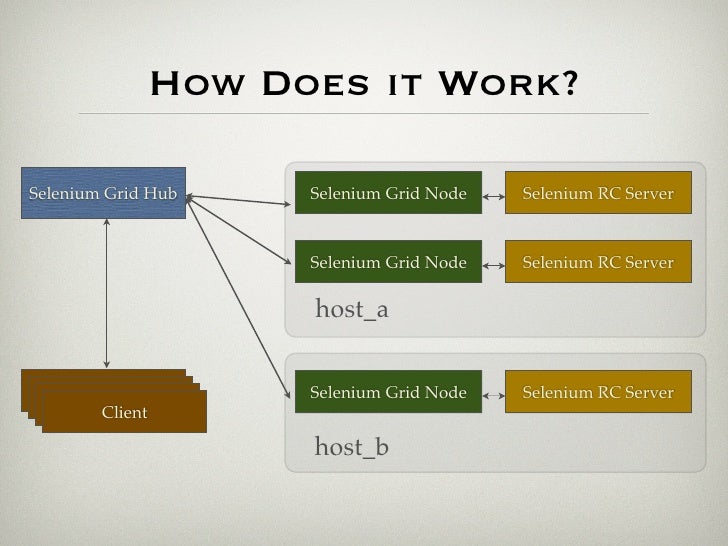
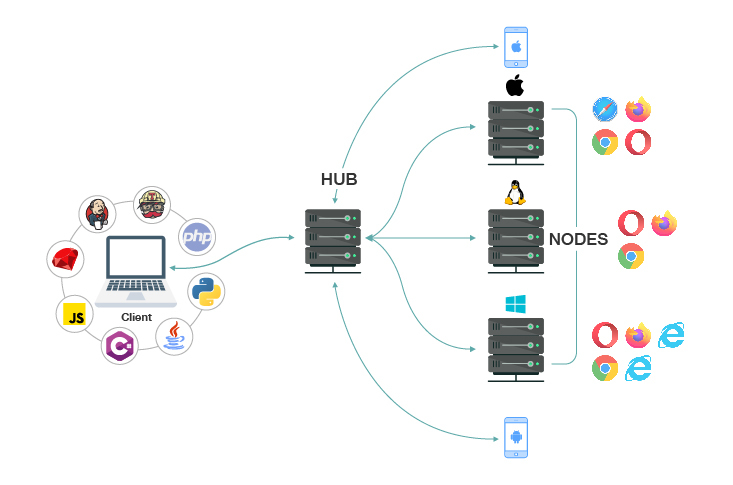
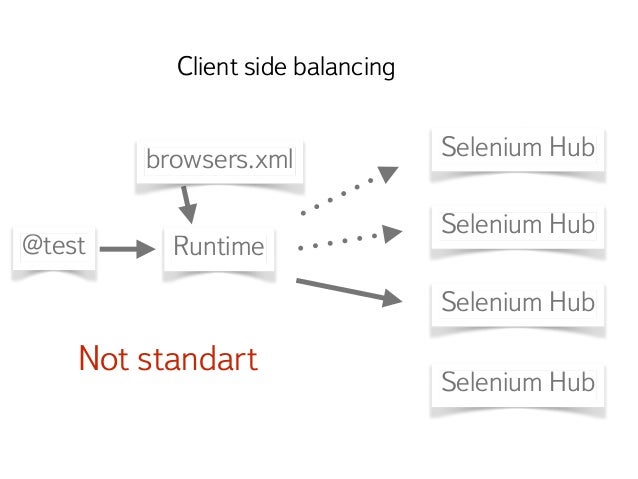
## Selenium Grid: 분산된 환경에서 Selenium 테스트 실행하기 Selenium Grid는 **여러 머신에서 동시에 Selenium 테스트를 실행할 수 있도록 해주는 도구**입니다. 이를 통해 테스트 실행 시간을 크게 단축하고, 다양한 브라우저 및 운영체제 조합에서 테스트를 수행하여 호환성을 확보할 수 있습니다. **Selenium Grid의 핵심 아이디어:** Selenium Grid는 **Hub**와 **Node**라는 두 가지 주요 구성 요소로 이루어집니다. * **Hub (허브):** * 테스트 명령을 수신하고, 어떤 Node에서 테스트를 실행할지 결정하는 **중앙 집중식 관리자** 역할을 합니다. * 테스트 클라이언트 (예: Selenium IDE, WebDriver 스크립트)는 Hub에 연결하여 테스트를 요청합니다. * Hub는 사용 가능한 Node들을 관리하며, 요청된 브라우저 및 OS 조합에 맞는 Node로 테스트를 전달합니다. * **Node (노드):** * 실제로 브라우저를 실행하고 테스트를 수행하는 **Selenium 인스턴스**입니다. * 각 Node는 특정 운영체제와 브라우저 조합을 지원하도록 설정될 수 있습니다. (예: Windows + Chrome, macOS + Firefox 등) * Node는 Hub에 등록하여 자신이 지원하는 브라우저 및 OS 정보를 Hub에 알립니다. **Selenium Grid의 작동 방식:** 1. **테스트 클라이언트 (WebDriver 스크립트 등)가 Hub에 연결:** 테스트를 실행하려는 경우, 테스트 스크립트는 Selenium Grid Hub의 주소로 연결합니다. 2. **Hub는 사용 가능한 Node를 찾습니다:** Hub는 등록된 Node들을 확인하고, 요청된 브라우저, OS, 버전 등과 일치하는 Node를 찾습니다. 3. **Hub는 테스트를 Node로 전달:** 일치하는 Node를 찾으면, Hub는 테스트 명령을 해당 Node로 전달합니다. 4. **Node는 브라우저를 실행하고 테스트를 수행:** Node는 전달받은 명령에 따라 해당 브라우저를 실행하고 테스트를 수행합니다. 5. **Node는 결과를 Hub에 반환:** 테스트가 완료되면 Node는 결과를 Hub에 반환합니다. 6. **Hub는 결과를 테스트 클라이언트에 전달:** Hub는 Node로부터 받은 결과를 테스트 클라이언트에게 전달합니다. **Selenium Grid를 사용하는 이유 (장점):** * **테스트 실행 시간 단축 (병렬 실행):** 여러 Node에서 동시에 테스트를 실행하여 전체 테스트 시간을 크게 줄일 수 있습니다. 특히 대규모 테스트 스위트의 경우 매우 효과적입니다. * **다양한 환경에서의 테스트 (크로스 브라우저/OS 테스트):** 서로 다른 운영체제 (Windows, macOS, Linux)와 브라우저 (Chrome, Firefox, Safari, Edge 등) 및 그 버전에 대한 테스트를 하나의 Grid에서 효율적으로 관리하고 실행할 수 있습니다. * **유지보수 용이성:** 여러 머신에 개별적으로 Selenium을 설치하고 관리하는 대신, Grid를 통해 중앙에서 관리할 수 있어 유지보수가 간편해집니다. * **확장성:** 필요에 따라 Node를 추가하거나 제거하여 테스트 환경을 유연하게 확장할 수 있습니다. * **테스트 효율성 증대:** 동시에 더 많은 테스트를 실행할 수 있으므로 개발 및 QA 팀의 생산성을 높일 수 있습니다. **Selenium Grid의 구성 요소 및 설치:** * **Selenium Server (Hub & Node):** Selenium Grid를 실행하기 위해서는 `selenium-server-standalone.jar` 파일을 다운로드하여 Hub와 Node로 실행합니다. * **WebDriver 바이너리:** 각 Node에서 지원할 브라우저에 해당하는 WebDriver (ChromeDriver, GeckoDriver 등)를 설치해야 합니다. **설치 및 실행 예시 (기본적인 Hub 및 Node 설정):** 1. **Selenium Server Standalone JAR 다운로드:** Selenium 공식 웹사이트에서 최신 버전의 `selenium-server-standalone-x.xx.x.jar` 파일을 다운로드합니다. 2. **Hub 실행:** ```bash java -jar selenium-server-standalone-x.xx.x.jar -role hub ``` 이 명령은 Hub를 시작하고 기본 포트(4444)에서 대기합니다. 3. **Node 실행 (예: Chrome on Windows):** * 먼저 해당 Node에 Chrome 브라우저와 ChromeDriver를 설치합니다. * 새로운 터미널 창을 열고 다음 명령을 실행합니다. ```bash java -jar selenium-server-standalone-x.xx.x.jar -role node -hub http://<hub_ip_address>:4444/grid/register -port 5555 -browser browserName=chrome,version=latest,platform=WINDOWS ``` * `<hub_ip_address>`는 Hub가 실행 중인 머신의 IP 주소로 변경해야 합니다. * `port`는 해당 Node가 사용할 포트 번호이며, 다른 Node와 겹치지 않도록 설정해야 합니다. * `-browser` 옵션으로 해당 Node가 지원하는 브라우저 정보를 등록합니다. **테스트 스크립트에서 Selenium Grid 사용하기 (Python 예시):** ```python from selenium import webdriver from selenium.webdriver.common.desired_capabilities import DesiredCapabilities # Hub URL hub_url = "http://<hub_ip_address>:4444/wd/hub" # Desired Capabilities (어떤 브라우저, OS에서 실행할지 정의) desired_caps = { 'browserName': 'chrome', 'platform': 'WINDOWS', 'version': 'latest' # 혹은 특정 버전 } # WebDriver 인스턴스 생성 (Grid를 통해) driver = webdriver.Remote( command_executor=hub_url, desired_capabilities=desired_caps ) # 테스트 코드 작성 driver.get("https://www.google.com") print(driver.title) driver.quit() ``` **추가 고려 사항:** * **Docker:** Selenium Grid를 Docker와 함께 사용하면 환경 설정 및 관리가 훨씬 용이해집니다. * **Selenium-Grid-v3 vs v4:** Selenium Grid v3와 v4는 아키텍처 및 설정 방식에 차이가 있습니다. v4는 Docker 환경에서의 사용성을 개선하고 더 많은 기능을 제공합니다. * **로드 밸런싱:** 여러 Hub를 사용하여 시스템의 가용성과 성능을 높일 수 있습니다. * **실패한 테스트 처리:** Grid 환경에서는 네트워크 문제 등으로 인해 테스트가 실패할 수 있으므로, 재시도 메커니즘 등을 고려해야 합니다. **요약:** Selenium Grid는 여러 머신에서 Selenium 테스트를 효율적으로 병렬 실행하고, 다양한 환경에서의 테스트를 지원하는 강력한 도구입니다. 이를 통해 테스트 실행 시간을 단축하고, 크로스 브라우저/OS 호환성을 확보하여 소프트웨어 품질을 향상시킬 수 있습니다. 더 궁금한 점이 있다면 언제든지 질문해주세요!
[ edureka! ] 2023-09-28 Selenium Grid Tutorial | Selenium training | Grid Tutorial | Edureka
[ The Testing Academy ] 2020-07-08 Selenium Grid Tutorial For Beginners (Step By Step) With Demo in 5 min | Day 29
[ SDET- QA ] 2024-08-15 Session 53: Selenium with Java | Hybrid Framework | Run Tests on Selenium Grid
[ Testing Chief ] 2020-08-17 Selenium Grid || Get Started in under 10 Minutes with Testing Chief!!!
[ Sauce Labs ] 2021-08-17 Selenium Grid: Build vs Buy
[ Suresh SDET Automation ] 2022-03-21 What is selenium grid 4 | Introduction and Basic Configuration | Part 1
[ John Watson Rooney ] 2023-11-29 This is the ONLY way I'll use Selenium now
[ Naveen AutomationLabs ] 2017-12-30 Selenium Grid Architecture - Part 1
[ TechBlossom2020 ] 2023-08-10 Selenium Grid || To run multiple tests simultaneously in different browsers & platforms?
[ SDET Automation Testing Interview Pro ] 2023-05-06 SELENIUM : What is Selenium Grid? SDET Automation Testing Interview Questions & Answers
[ SDET Unicorns by Dilpreet Johal ] 2021-07-14 Docker Selenium Grid Setup | Selenium Grid Tutorial
[ Naveen AutomationLabs ] 2020-08-15 Selenium Grid Setup - Design & Infrastructure on WhiteBoard
[ DevCrafters ] 2023-03-04 Top 10 Selenium Grid Interview Questions and Answers
[ ConfEngine ] 2014-09-17 Scaling and managing Selenium Grid by Dima Kovalenko @ Selenium Conf 14
[ edureka! ] 2022-06-04 Selenium Grid Tutorial For Beginners | Selenium Tutorial | Selenium Training | Edureka Rewind - 7
[ Ethesh ] 2023-09-30 Selenium Grid
[ Maximum Automation ] 2023-01-10 What is Selenium Grid? | How does it work? | When should you use Selenium Grid?
[ QAFox ] 2021-01-22 What is Selenium Grid and when do we go for it? (Interview Question #2)
[ SDET Automation Testing Interview Pro ] 2023-05-27 SELENIUM : What are the challenges of using a Selenium Grid?
[ Automation Accelerators ] 2020-04-19 Selenium Grid Example using Maven & TestNG (JAVA)
[ Execute Automation ] 2019-10-24 Understanding new Selenium Grid 4 for distributed testing
[ SDET- QA ] 2024-08-22 Session 54: Selenium with Java | Hybrid Framework | Docker Integration with SeleniumGrid
[ NDC Conferences ] 2022-08-08 Kubernetes and Selenium Grid for highly scalable browser and device farm - Ragavan Ambighananthan
[ SDET Automation Testing Interview Pro ] 2023-01-25 When should we use Selenium Grid? SDET Automation Testing Interview Questions & Answers
[ QAFox ] 2023-08-28 What is the difference between Selenium Grid & Selenium WebDriver (Selenium Interview Question #536)
인바이즈
크롤링
Testament/Oriental Creation/Game